What About Privacy?
When AI begins reading information across email, files, conversations, and documents, privacy is an obvious concern.
Google says Workspace content remains under the user’s control and that Workspace data is not used to train or improve the underlying generative AI models outside Workspace without permission.
For eligible Google AI users working with Gemini inside services including Gmail, Docs, Drive, Sheets, Slides, Calendar, Chat, Meet, and Vids, Google says the content used to answer prompts is not used to train or improve Gemini or other generative AI models.
That does not mean every document should automatically be handed to AI.
Organizations still need to decide what information employees are permitted to use.
Individuals should still consider whether a particular file contains confidential, financial, customer, employee, or other sensitive information.
Permissions matter too.
A system that can work across several applications is more powerful partly because it can see more.
That makes it important to understand what sources have been selected and what access has been enabled.
Read Google’s Gemini in Workspace privacy and data protection guidance
Who Gets the New Gemini Workspace Capabilities?
Google says the September 9 capabilities are rolling out for customers with several eligible plans, including:
Business Standard and Business Plus.
Enterprise Standard and Enterprise Plus.
Google AI Pro and Google AI Ultra personal plans.
Google AI Pro for Education.
Availability is not necessarily identical across every application at the same moment.
Google specifically says users can try Ask Gemini in Drive as the rollout progresses, while the new Chat experience is expected to become available in the coming weeks.
Some individual Gemini features also have their own requirements involving account type, language, desktop availability, administrator settings, or rollout status.
That means two people using Google Workspace may not immediately see exactly the same AI tools.
If you do not see one of the new options yet, it does not necessarily mean your account will never receive it.
The rollout may simply not have reached that app or account.
What Should You Actually Try First?
The most useful starting point probably is not asking Gemini to run your entire workday.
Pick one workflow where you regularly move the same information between applications.
For example:
You repeatedly turn project notes into client emails.
You regularly build reports from information stored in Drive.
You often convert written documents into presentations.
You receive long email threads that eventually need to become project briefs.
Those are good places to test whether the new capabilities actually save time.
Start with information you can easily verify.
Review what Gemini produces.
Check important names, dates, numbers, commitments, and conclusions against the original sources.
Then decide whether the workflow is worth keeping.
The goal should be to remove friction, not simply to use AI because a new feature exists.
Human Review Still Matters
Google itself warns users that Gemini features can produce inaccurate or inappropriate suggestions and should not be relied upon as professional medical, legal, financial, or other specialized advice.
That warning becomes even more important when AI-generated work looks polished.
A professionally formatted presentation can still contain an incorrect number.
A well-written email can still misrepresent a decision.
A structured brief can still omit an important detail from a long conversation.
A spreadsheet can still organize the wrong information.
Automation makes output faster.
It does not make verification unnecessary.
The safest model is still controlled delegation.
Let the AI gather.
Let it organize.
Let it build the first version.
Then review the result before it creates a real-world consequence.
That is especially important before sending messages, sharing documents externally, making business commitments, or presenting AI-generated information as fact.
The Bigger Question: Does Less App Switching Actually Mean Less Work?
Google’s announcement repeatedly focuses on staying in the flow.
That is a reasonable goal.
Constantly switching between email, documents, spreadsheets, presentations, and messaging apps can fragment attention.
If Gemini can remove some of those transitions, it may genuinely save time.
But there is another possibility.
When creating a presentation takes less time, we may simply create more presentations.
When writing a project brief takes five minutes, we may begin expecting one for every project.
When AI can turn one piece of information into five different outputs, the number of outputs expected from us may increase.
That is the same productivity tension explored in AI Is Saving Us Time—So Why Do We Feel Busier?.
Better tools can reduce work.
They can also raise expectations.
The difference depends partly on how we choose to use them.
Google Workspace Is Moving From Apps Toward Outcomes
For years, productivity software has been organized around applications.
Need to write something?
Open Docs.
Need to send something?
Open Gmail.
Need numbers?
Open Sheets.
Need a presentation?
Open Slides.
Google’s new Gemini capabilities suggest a different model.
You begin with the outcome.
“Create a project update.”
“Turn this conversation into a presentation.”
“Build a spreadsheet from these files.”
“Turn this email thread into a brief.”
“Send my team an update about this document.”
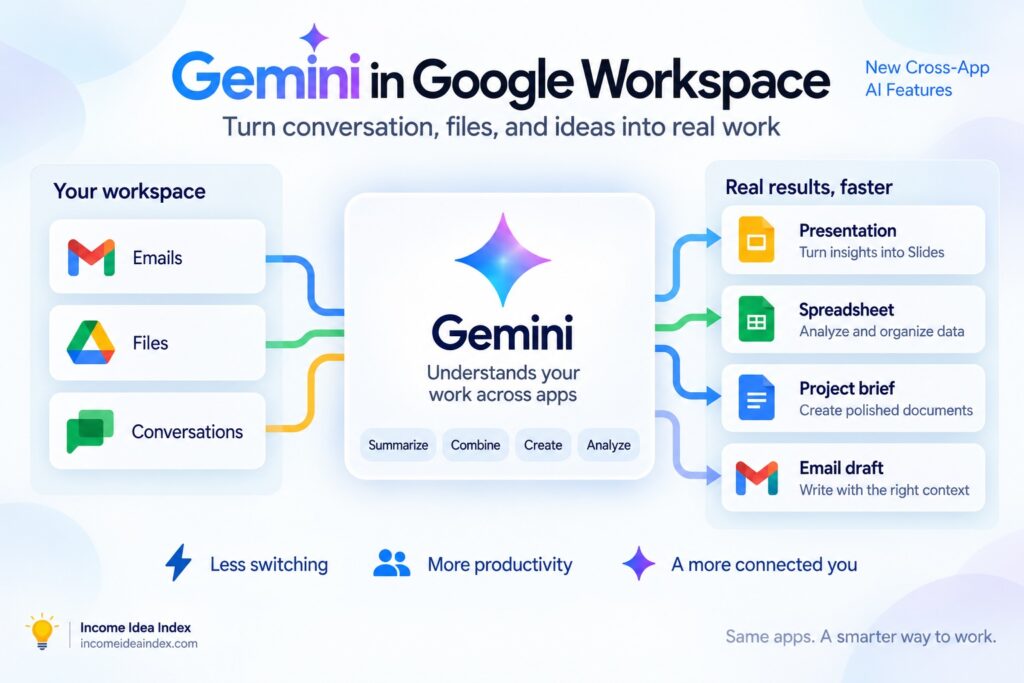
Gemini then helps determine which Workspace tools and information are needed to produce it.
That may be the more important story behind this update.
The future of productivity software may not be about adding AI buttons to every application.
It may be about making the boundaries between those applications matter less.
The Bottom Line
Google’s latest Gemini update moves Workspace another step from AI-assisted applications toward AI-assisted workflows.
The five examples announced on September 9 are practical:
Chat conversations can become presentations.
Drive information can become structured spreadsheets.
Docs can become contextual emails.
Email threads can become organized briefs.
Written proposals can become editable branded slide decks.
But the larger change is how those tasks connect.
Gemini can increasingly gather context from approved sources across Workspace and use that information to help complete a larger goal.
For small businesses, freelancers, teams, and anyone who spends too much time moving the same information between applications, that could be genuinely useful.
The best test will not be how impressive the demonstration looks.
It will be whether the feature removes work you previously had to do manually.
If Gemini saves you from repeatedly searching, copying, formatting, reorganizing, and rebuilding information you already have, then Google’s promise of less switching and more flow may amount to more than another AI slogan.
Just remember to keep one part of the workflow firmly human:
the final decision.