3. You Can Draft—and Potentially Send—an Email Without Leaving Google Docs
The flow works in the opposite direction too.
Suppose you have just finished updating a strategy document.
Now you need to email your team explaining what changed and what they should do next.
Normally, you would switch to Gmail, copy important information from the document, write the email, check that you included everything, and then send it.
Gemini can now help handle that transition from inside Docs.
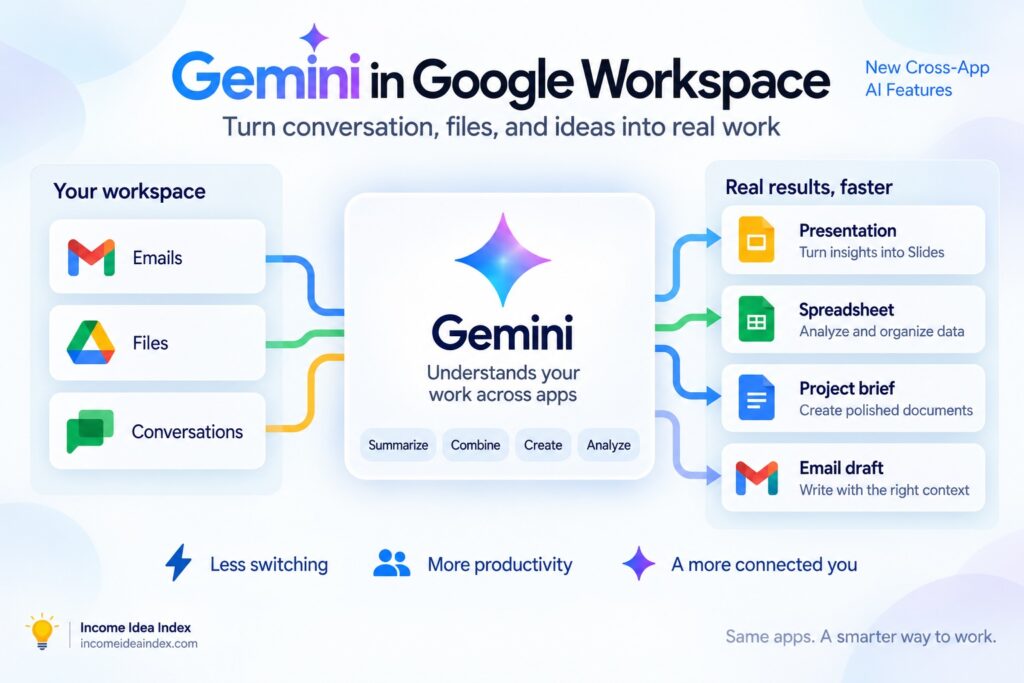
Google says Gemini can use the document’s context along with other selected or administrator-enabled project information to draft an email that summarizes the relevant progress.
You can review the draft, add recipients, make changes, and send it.
Google says users can even send the email directly from Docs when the feature is available to them.
That might sound like a small improvement.
But this is exactly where cross-app AI could become useful.
A large amount of office work consists of taking information from one place and repackaging it for another.
Document to email.
Email to document.
Document to presentation.
Files to spreadsheet.
Meeting to task list.
Individually, those transitions may only take a few minutes.
Repeated throughout the day, they create a surprising amount of friction.
Google’s approach is increasingly about removing those transitions.
4. Long Gmail Threads Can Become Structured Documents
Email chains are another obvious target.
A project may begin with one message and eventually become dozens of replies containing decisions, changes, deadlines, ideas, files, and unanswered questions.
By the time someone asks for a clean project brief, understanding the conversation can take longer than writing the brief itself.
Google says Gemini in Gmail can now use the active email thread along with relevant approved information from Drive, other emails, and Chat to build a structured Google Doc.
The resulting document can organize information such as:
Goals.
Important details.
Next steps.
Project context.
Rather than copying and pasting messages manually, you begin with a structured document and review it.
For anyone who regularly receives long client conversations, team discussions, project updates, or planning emails, this may be one of the most immediately useful features in the update.
It also illustrates why Google’s broader Workspace strategy matters.
Gemini is not limited to summarizing the email currently on your screen.
It can potentially connect that email with other relevant Workspace information so the result has more context.
5. A Google Doc Can Become a Branded Slide Deck
The fifth major capability addresses another familiar problem.
You have already done the hard work.
The strategy is written.
The research is finished.
The proposal exists in Google Docs.
Then someone asks:
“Can you turn this into a presentation?”
That request often creates a second project.
You have to decide which information belongs on slides, shorten the text, choose a visual structure, add images or charts, and rebuild the material in Google Slides.
Google says Gemini can now transform a written proposal in Docs into a fully editable slide deck.
Gemini identifies important points and organizes them into visual slides.
If the user provides an existing slide template or brand guidelines, Google says Gemini can use that material to match the organization’s visual style.
The resulting presentation is saved to Drive and remains editable.
That is an important difference between generating a picture of a presentation and creating an actual presentation.
The slides can still be changed.
Text can be rewritten.
Layouts can be adjusted.
Images can be replaced.
The AI is creating the starting structure rather than locking the user into a finished output.
This Is More Than Five New Features
Google highlighted five workflows in the September announcement, but the broader direction extends beyond them.
Gemini can also assist with Deep Research and increasingly work with scheduling, tasks, and other Workspace activities.
Google says users can use Workspace AI to help find available meeting times, resolve calendar conflicts, create reminders, and build Google Tasks lists.
The company also plans to use these capabilities in Workspace Studio, its system for building automated Workspace workflows.
That means the individual features are really examples of something larger.
Google is trying to make Gemini a layer that sits across the Workspace ecosystem.
The individual application becomes less important than the outcome you are trying to produce.