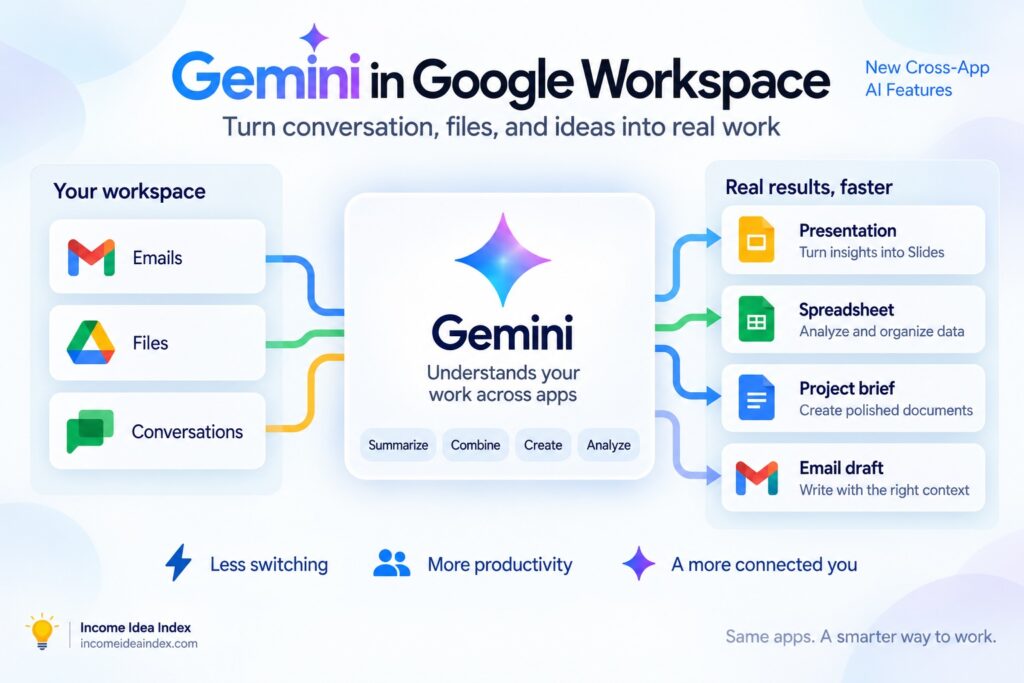
Gemini in Google Workspace is becoming considerably more powerful, with new AI capabilities that can work across Gmail, Drive, Docs, Sheets, Slides, and Chat.
On September 9, 2026, Google announced a new group of agentic AI capabilities across Google Workspace that allow Gemini to complete more complicated tasks involving Gmail, Drive, Docs, Sheets, Slides, and Chat.
The important change is not simply that Gemini exists inside more Google apps.
It is that Gemini can increasingly work across those apps.
Instead of asking AI to summarize one email or rewrite one paragraph, users can give Gemini a larger goal and allow it to gather relevant information from selected Workspace sources, organize that information, and create something new from it.
A conversation in Google Chat could become a presentation.
A Drive folder filled with project files could become a structured spreadsheet.
A long Gmail thread could become a formatted project brief.
A written proposal in Docs could become a branded slide deck.
Google describes Gemini as becoming an intelligent orchestrator inside Workspace rather than simply an assistant attached to individual applications.
Read Google’s official September 9 Workspace announcement
Google Workspace Is Becoming More Agentic
Gemini has already been available inside Google Workspace for tasks such as summarizing documents, drafting emails, generating images, analyzing information, and creating slides.
The latest update pushes that model further.
Instead of treating Gmail, Drive, Docs, Sheets, Slides, and Chat as separate places where AI happens to be available, Google is increasingly connecting them into one AI-assisted workflow.
That distinction matters.
Imagine that you are preparing an update for a project.
The information you need may be scattered across:
- A conversation in Google Chat
- Several email threads in Gmail
- Documents stored in Drive
- A spreadsheet containing numbers
- A previous presentation
- Notes or action items from your team
Traditionally, you would open each source, gather the information yourself, decide what matters, and then build the finished document or presentation.
Gemini can increasingly perform some of that collection and organization for you.
Google says these capabilities are powered by Workspace Intelligence, which can use real-time context from relevant files, emails, conversations, projects, and other Workspace information available to the user.
This is much closer to the type of AI agent we discussed in AI Agents for Beginners: What They Can Do—and Where You Should Stay in Control.
The AI is no longer only answering.
It is being asked to work toward an outcome.
1. Google Chat Can Become the Starting Point for a Presentation
One of Google’s clearest examples begins inside Google Chat.
Suppose your team has been discussing a product launch for several weeks.
Updates are scattered across conversations, emails, project files, and action items.
Then someone asks for a presentation showing the current status of the project.
Normally, that request starts another round of searching.
You find the relevant messages.
Open documents.
Look for current numbers.
Determine which tasks have been completed.
Then open Google Slides and begin assembling the presentation.
With the new Gemini capability, you can ask Gemini from inside Chat to gather relevant project information and start building the presentation for you.
Google says Gemini can gather insights from active projects, Chat conversations, Gmail, and action items and then generate a multi-slide presentation based on that information.
The presentation is created in Google Slides, where you can review and edit it.
That final part is important.
The AI is doing the first round of research, organization, and construction.
You still decide whether the result is correct and whether it communicates what you actually want to say.
Google also says Gemini may ask clarifying questions as this experience develops, which could help make automatically generated presentations more specific to the user’s needs.
2. Gemini Can Build a Spreadsheet From Information in Google Drive
Google Drive is also becoming more active.
A folder is traditionally just a place where information sits.
You may have PDFs, proposals, reports, specifications, invoices, spreadsheets, and other documents stored together, but someone still needs to open those files and organize the useful information.
Gemini can now help turn that folder into structured work.
Google’s example involves project files containing information such as costs, materials, and sustainability data.
A user can ask Gemini from Drive to analyze the supplied folder and relevant approved sources and organize the information into a spreadsheet.
The result can then be refined in Google Sheets.
This could have many practical uses.
A freelancer might organize project expenses from several documents.
A small business might consolidate supplier information.
A marketer might pull campaign information from a collection of reports.
A project manager might turn scattered specifications into a tracking sheet.
The common thread is that the information already exists.
The time-consuming part is gathering and restructuring it.
This is exactly the kind of work where AI can be useful because much of the effort comes from moving information between formats rather than making a difficult judgment.
Our guide to 7 Practical Ways to Use AI to Save Time Every Week discusses the same principle: AI tends to be most useful when it removes repetitive organization, drafting, and information-processing work while leaving important decisions with the person using it.